Turning a dead 27-inch 5K iMac into a monitor
A 27-inch 5K iMac stops being a useful computer years before its screen stops being a great screen. Mine stopped booting: the logic board had failed, and a replacement board costs more than the machine is worth. The display did not care. Behind the glass is an LG LM270QQ1 panel, 5120 by 2880 at 218 pixels per inch, wide gamut, with a proper LED backlight, and nothing at its used price comes close. So the computer became a monitor.
Getting in
Since the 2012 redesign the display assembly is glued to the chassis with foam adhesive strips around the edge. A plastic pizza-cutter style tool run around the perimeter slices the foam. The display then hinges up from the bottom with two cables to disconnect: the eDP display cable and the backlight power cable. From there the logic board, power supply, fan, and drive all come out, leaving an empty aluminum shell, the panel, and the stand.
Reassembly needs a new set of adhesive strips, which are cheap and cut to fit the model. Do not reuse the old foam.
The driver board
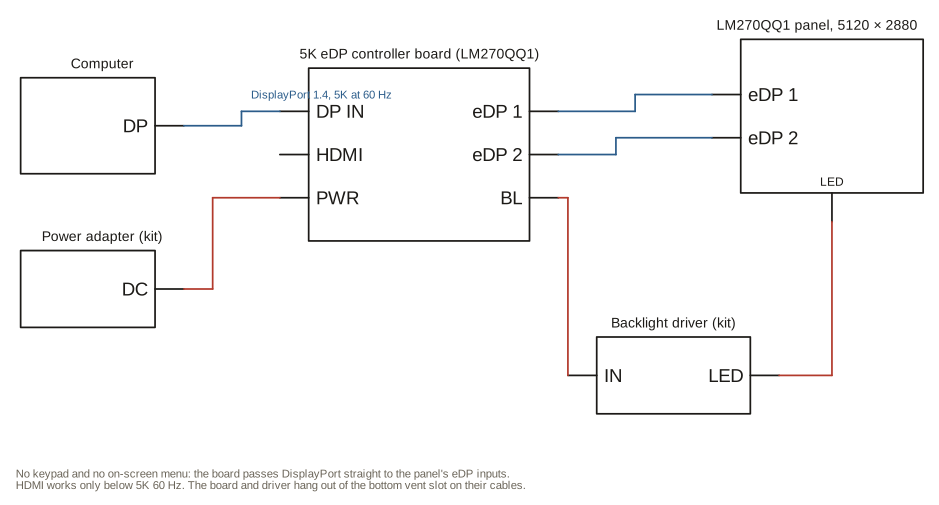
The panel speaks embedded DisplayPort and expects the logic board to drive it and to power the backlight. A third-party board replaces both jobs. I used a 5K eDP controller board sold for the LM270QQ1, about a hundred dollars, with DisplayPort and HDMI inputs. It comes with the eDP cable that matches the panel’s connector, a backlight driver, and a power adapter. When ordering, match the panel name on the label, because the 1440p panel in the 2012 and 2013 models uses a different connector and a different board.
DisplayPort is the input that matters. The full 5120 by 2880 at 60 Hz needs DisplayPort 1.4 bandwidth, and the HDMI input on boards in this class is a fallback at lower resolution or refresh. Over DisplayPort there is no scaling: the computer sees a native 5K display and the picture is as sharp as it was in the iMac.
There is no on-screen menu and no keypad. The board passes the signal to the panel and that is all it does, which is all I wanted.
Mounting, or not
The tidy version of this project mounts the board where the logic board lived and routes the jacks through the old port openings. I did not do the tidy version. The board hangs out of the vent slot along the bottom edge of the chassis on its cables, where the DisplayPort and power plugs are easy to reach and nothing needed drilling. It has been like that since the day I did it, and I have not found a reason to change it. The board is light, the eDP cable is short, and the slot keeps it from swinging.
What you get
A 27-inch 5K display in an aluminum shell on a good stand, for the price of a driver board and an evening. Things to know before doing it:
- Brightness is a little lower than it was in the iMac. The kit’s backlight driver is not tuned as well as Apple’s, and the anti-reflective glass eats a bit.
- The camera, speakers, and USB ports are dead unless you go out of your way to wire them to something. Most people, me included, leave them.
- Board quality varies between sellers and price is not a reliable signal. Read the listing for your exact panel and check that other buyers used it with a 5K A1419.
- Your video source needs DisplayPort 1.4, or a USB-C port that carries it, to drive 5K at 60 Hz.
It has been in daily use since May 2025.
Tagged hardware, repair, displays, imac.